
Training With Friends: Why a Partner Keeps You Consistent – and How to Meet Up
With a training partner, workouts rarely get skipped. Here's how to use the feed, cheers and meetups in Strive Up to train together regularly – at the park or in the gym.
Contents
Why training together works better
On your own, an excuse is easy to find: too tired, too cold, tomorrow works too. When someone is waiting for you at the park at 6 pm, it's a different story. A fixed time with a friend is the simplest way to train consistently – and consistency beats any perfect program.
On top of that, you usually train harder with a partner. You watch each other's sets, spot each other on new exercises and correct each other's form. And when one of you sets a new record, the other wants to catch up.
What a training partner gives you
- • Fixed appointments instead of “sometime this week”
- • Someone who sees your technique and corrects it
- • A little competition – in the best sense
- • More fun, especially during long sessions at the park
The feed: see what your friends are training
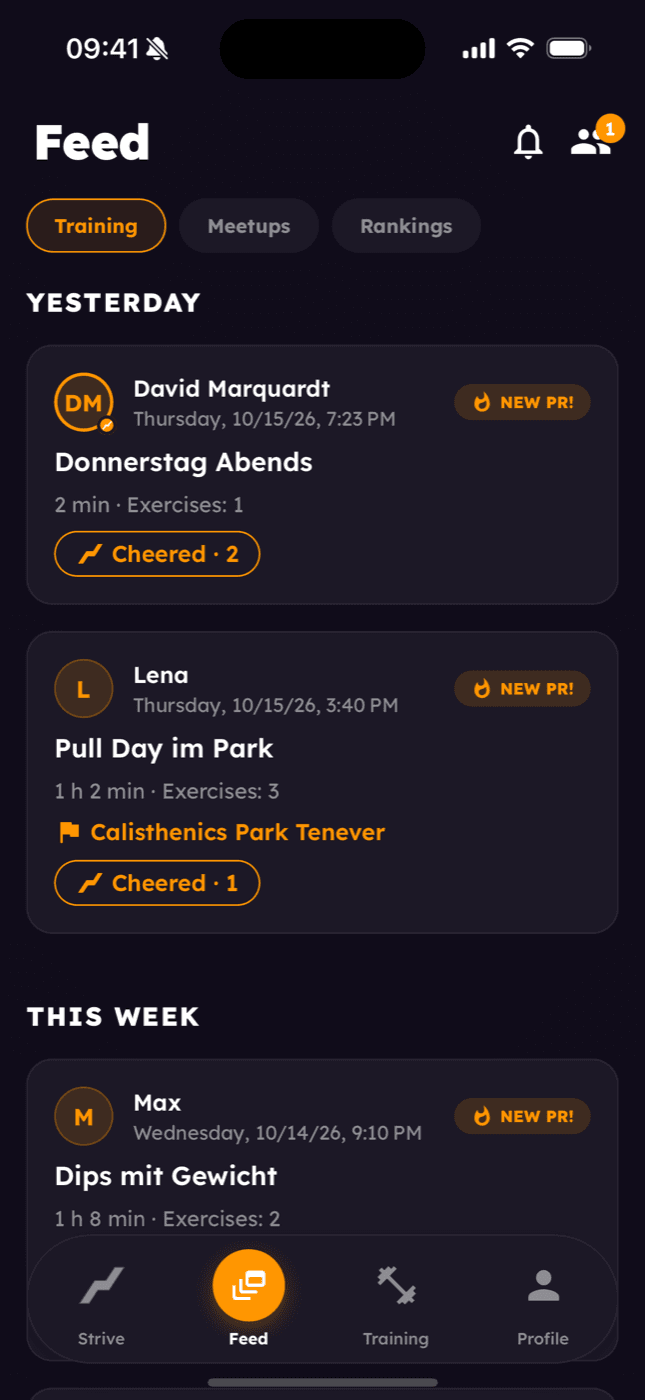
In Strive Up, the feed is the first screen of the app. It shows your friends' workouts: when they trained, for how long, how many exercises and where. If someone hit a new personal best, the app marks the workout with “New PR!”.
One tap cheers your friends on. They get a notification and see on their workout card how many people cheered. It sounds small, but it's surprisingly motivating – especially after a hard session where nobody would otherwise have noticed that you finally got your first muscle-up.
Let friends know
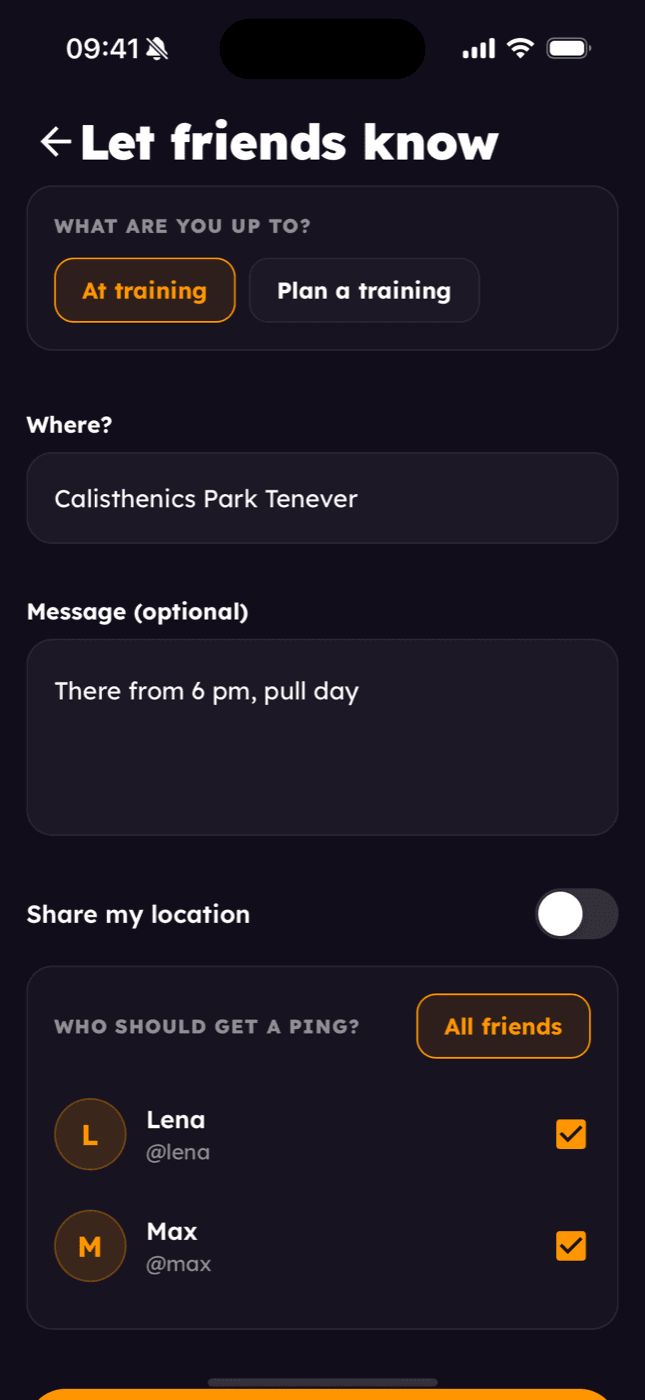
Heading to the park on short notice and want to know if anyone's joining? Under Feed → Meetups → Let friends know you send a quick update to all or selected friends:
- What are you up to? – “At training” or “Plan a training”
- Where? – for example the name of your calisthenics park
- Message – like “there from 6 pm”
- Location – only if you explicitly share it
Your friends reply with a single tap: “I'm coming”, “Coming a bit later”, “Maybe” or “Can't make it”. So you already know on your way who will be there. If you like, you can also set your friends to get a heads-up automatically every time you start a workout.
Meetups with a workout plan
For regular sessions there are meetups. You set when and where you'll train, optionally give it a title – like “Leg day in the park” – and invite friends. Everyone answers “I'm in”, “Maybe” or “Can't”, and you see at a glance who's coming. If you move the time, the app asks everyone invited again.
The best part: you can attach a workout plan to the meetup. Your friends take it over with one tap or train their own plan. For skill exercises, everyone automatically trains their own open steps – so you work on your front lever and your friend on theirs, even though you follow the same plan. Everyone enters their own weights.
Meetups can also be shared as a link, for example in your WhatsApp group. If you allow it, invitees can bring their own friends – even if they aren't friends with you. Anyone who doesn't have the app yet lands on an invitation page via the link and goes to the store from there.
How to train together effectively
Training together doesn't mean you both need to be at the same level. These formats work even when your levels differ:
- Taking turns: One of you does a set while the other rests – then you switch. Your rest is exactly as long as your partner's set.
- EMOM: You both start at the top of every minute, each with your own rep count. More in the article on EMOM training.
- Ladder: You both add one rep per round until one of you drops out. See the article on circuit and ladder training.
- Same exercise, different level: One does pull-ups, the other Australian pull-ups – on the same rhythm.
What your friends can see
What you share is only visible to accepted friends. Your workouts are visible by default, records and stats only once you share them. You can change each of these in your profile under “Visibility”. And there's a fair rule: you only see your friends' workouts if you share your own – the same goes for records and stats.
When you share your records, you can also compete with your friends on the leaderboard – more on that in the article about the calisthenics leaderboard.
Train smarter with Strive Up
Track your training, use the EMOM timer, follow your PRs and discover your personal skill roadmap – for free.


Related articles
Calisthenics Leaderboard: Chase Records With Friends and at Your Park
Who can do the most pull-ups? With the leaderboards in Strive Up, you compete with your friends and with everyone training at the same calisthenics park – fairly split by bodyweight and added weight.
How to Break a Training Plateau: Why You're Stuck and How to Get Moving Again
Stuck at 8 pull-ups for weeks? A training plateau is rarely about lacking strength — it's almost always about lacking direction. Three simple rules to start making progress again.
Calisthenics Workout Plan: A Simple 3-Day Plan to Save
"So… what am I doing today?" Without a plan, you only ever train your strengths. Why a workout plan makes such a difference, plus a simple 3-day plan with pull, push, and legs & core.